
Training Management System Built to Grow a Training Business
TryTami simplifies the operations behind every training program so you can run more sessions, more efficiently, and keep more of what you earn. Catalog, scheduling, instructors, proposals, revenue, evaluations, and ops intelligence in one platform.
What is a training management system?
A training management system (TMS), also called training management software, is the operational backbone for organizations that deliver instructor-led training: it coordinates courses, trainers, clients, and money in one system. TryTami is a TMS built specifically for ILT providers, with AI instructor matching and no per-seat fees.
Unlike a learning management system (LMS), which is built to deliver self-paced content to learners, a TMS manages the back-office work behind live, instructor-led delivery, scheduling sessions, matching trainers to clients, generating proposals, tracking revenue per course, and reporting on utilization. TryTami also handles virtual instructor-led training (VILT) alongside classroom and blended delivery.
| Job | How TryTami does it | The spreadsheet/LMS way |
|---|---|---|
| Staff a session | AI instructor matching on availability, skills, history | Email the bench, wait days |
| Schedule without conflicts | Calendar/board views, conflict detection, Google + Outlook sync | Cross-check three calendars |
| Win the work | Stage-based proposal pipeline | Word docs and a CRM that doesn't know your catalog |
| Get paid | Invoicing, client balances, trainer pay | Month-end reconciliation |
| Know your margin | Revenue and cost per session, program, client, instructor | Quarterly guesswork |
Talk to the founders (30 min)Both ran a 300-instructor training company. No per-seat fees, live in about two weeks.
What's inside
Everything an instructor-led training business needs, without the back office tax.
Most training providers stitch together a CRM, a calendar tool, an LMS, and a spreadsheet. TryTami consolidates all of it into one purpose-built platform.
Course catalog
One source of truth for every course you offer, duration, capacity, pricing, materials, and the trainers qualified to deliver it.
Schedule + calendar
Visualize every session across every client, see trainer availability at a glance, and resolve conflicts before they bite.
Trainer network
Manage in-house and contract trainers with availability, skills, certifications, and utilization in one view.
Proposals + sales
Move clients from request to confirmed booking with a stage-by-stage proposal pipeline, Submitted, Designing, Search, Pick Trainer.
Revenue + billing
Track booked, dedicated, and public-course revenue, client balances, and what's owed to trainers, automatically.
Operations intelligence
Know which courses are profitable, which trainers are over-utilized, and which clients are slipping, before your books close.
Who uses training management software
PSA vs TMS
Why a training company needs a TMS, not professional services automation.
Training companies
Commercial providers selling and delivering ILT at scale.
Corporate training teams
Internal L&D running live programs for employees.
Enterprise L&D
Multi-region delivery with business-unit reporting.
Customer education teams
Product and customer training that drives adoption.
Sales enablement leaders
Ramp, methodology rollouts, and ongoing rep training.
L&D operations
The back office behind every program you ship.
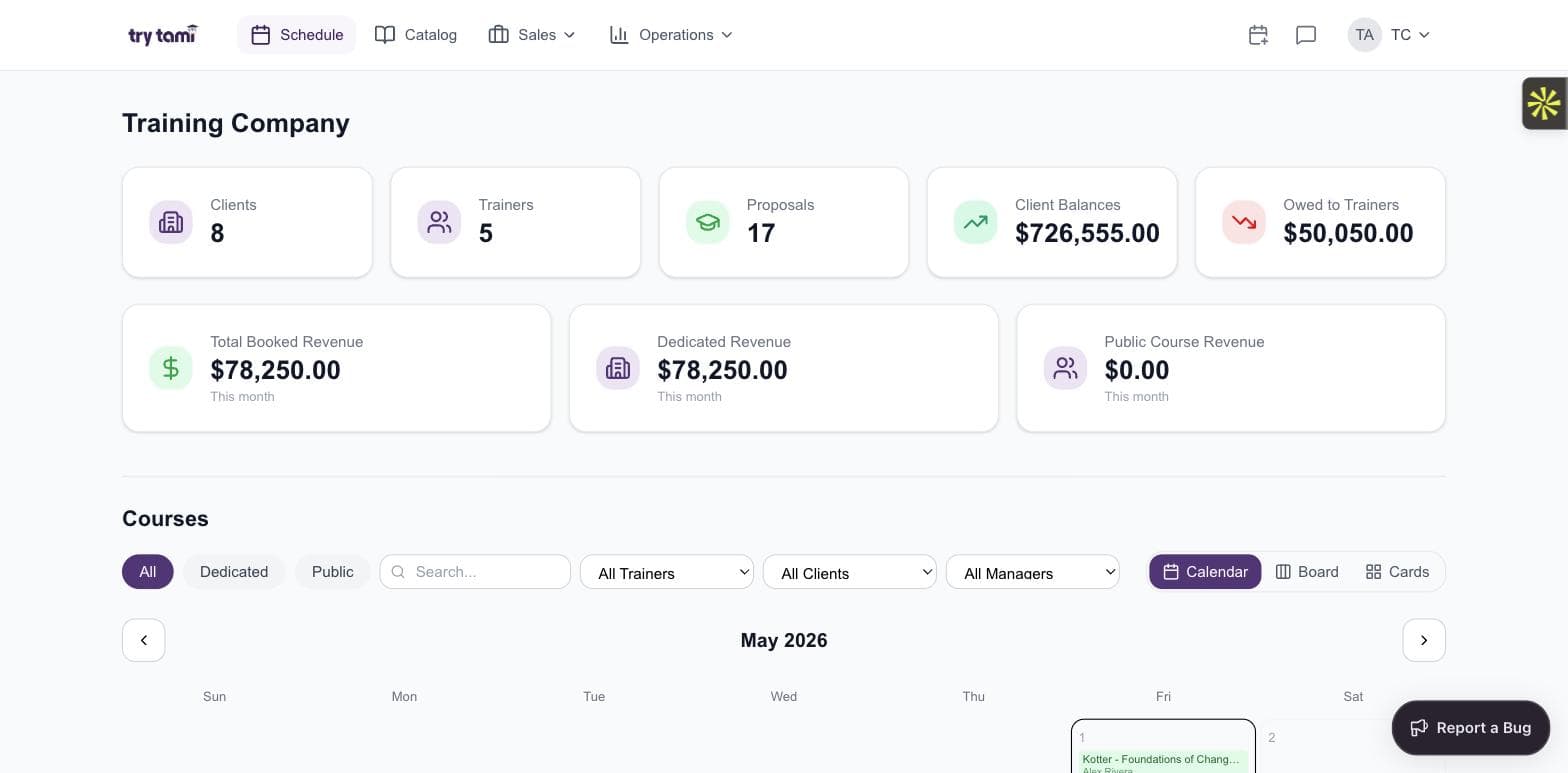
Schedule
See your entire training operation on one screen.
Every confirmed session, every trainer, every client, one calendar, no double-booking, no Slack threads asking who's free next Tuesday.
- Calendar, board, and card views
- Filter by trainer, client, or program manager
- Public, dedicated, and on-site courses in one place
- Trainer availability + utilization layered in
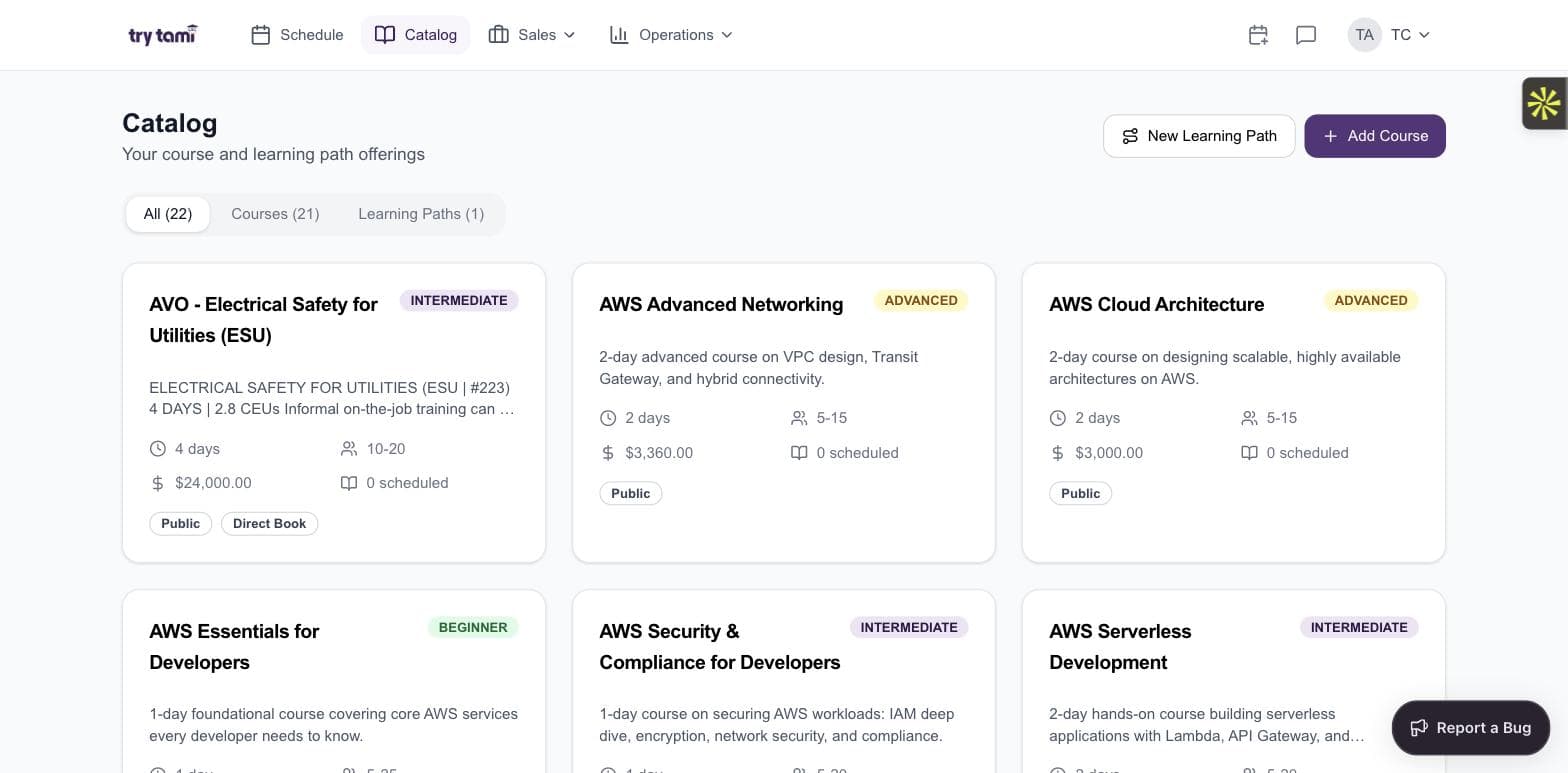
Catalog
One catalog. Every course. Every learning path.
Build your course catalog once and schedule from it forever. Define duration, capacity, pricing, and the skills required to teach it, TryTami uses that data everywhere it matters.
- Courses + multi-course learning paths
- Difficulty levels (beginner / intermediate / advanced)
- Per-course pricing and capacity rules
- One-click schedule from catalog to calendar
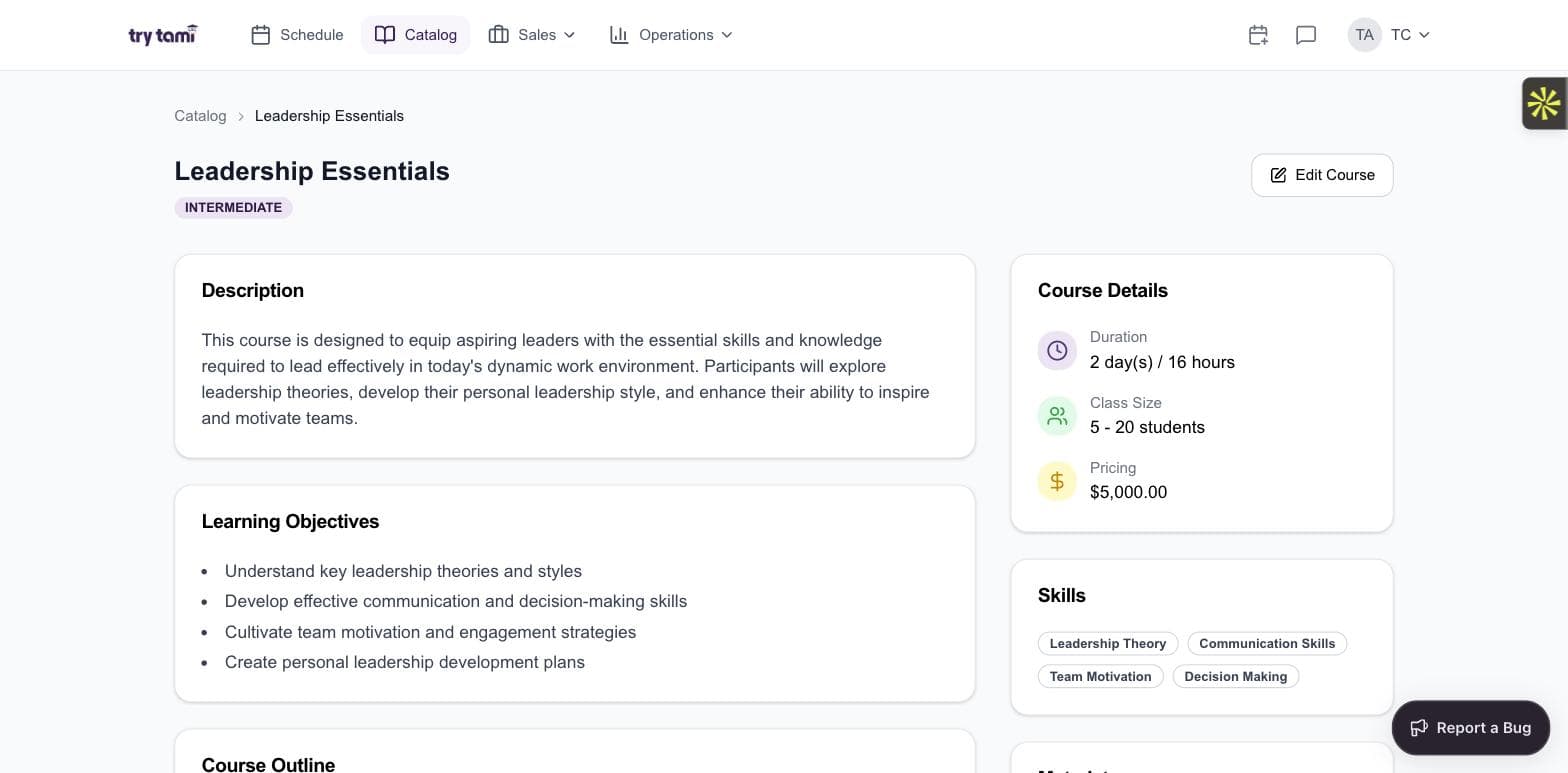
Course detail
Every course is a real spec, not a PDF.
Description, learning objectives, course outline, required skills, duration, class size, pricing. Used by sales, ops, trainers, and customers, the same source of truth.
- Structured learning objectives + outline
- Required skills feed AI instructor matching
- Duration + class size + pricing in one record
- One edit updates every downstream surface
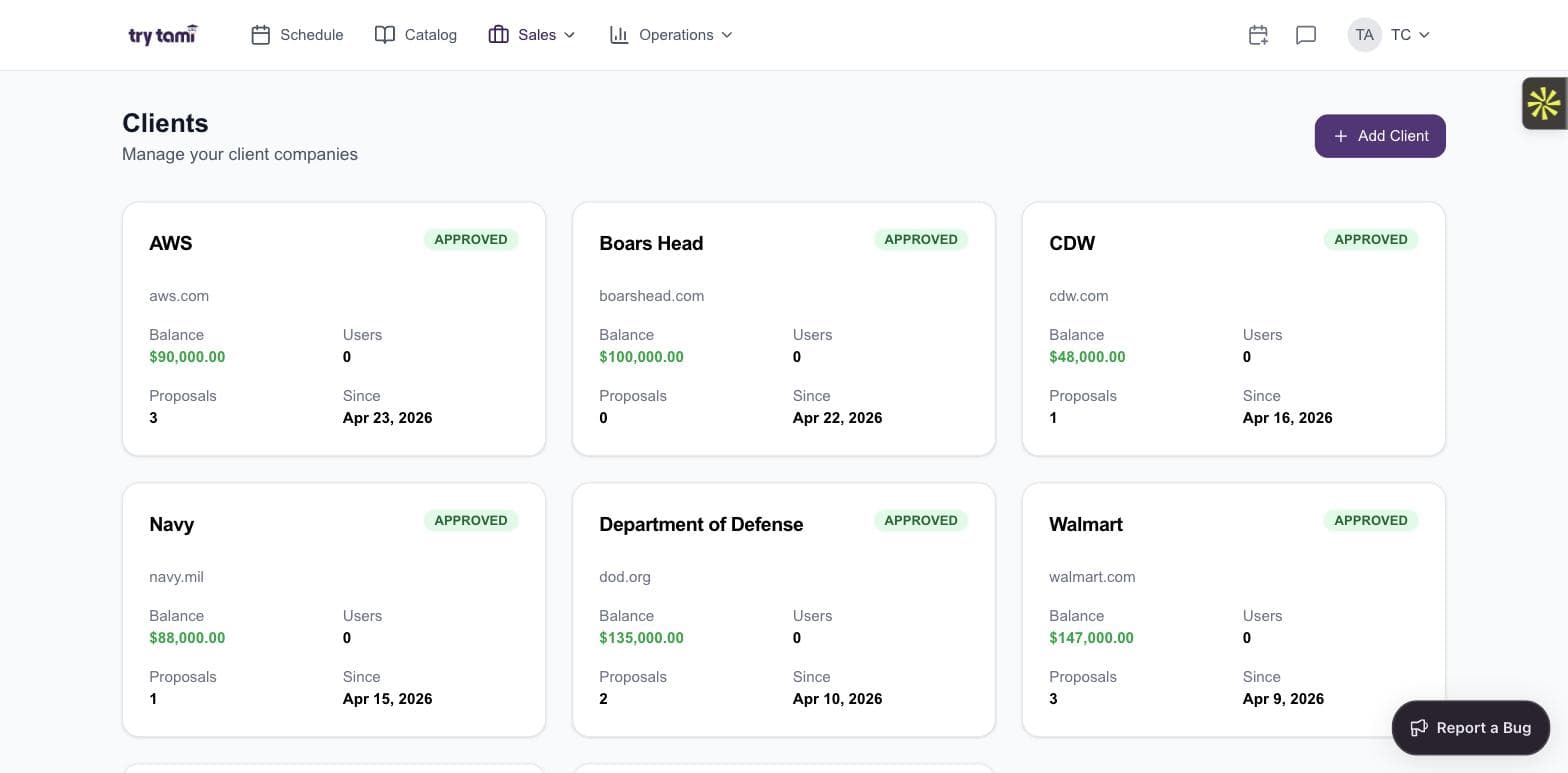
Clients
Every client account, every balance, every proposal.
The CRM that lives where the work happens. Prepaid balances, proposals in flight, registered users, status, and history, all per client, all live.
- Client cards with balance, users, and proposals at a glance
- Status: Approved, Pending, Inactive
- Drill into per-client course history and trainer assignments
- Self-onboard or invite procurement to the customer portal
Stop running training on spreadsheets.
See how TryTami replaces 8+ tools with one platform, in a 30-minute live walkthrough.
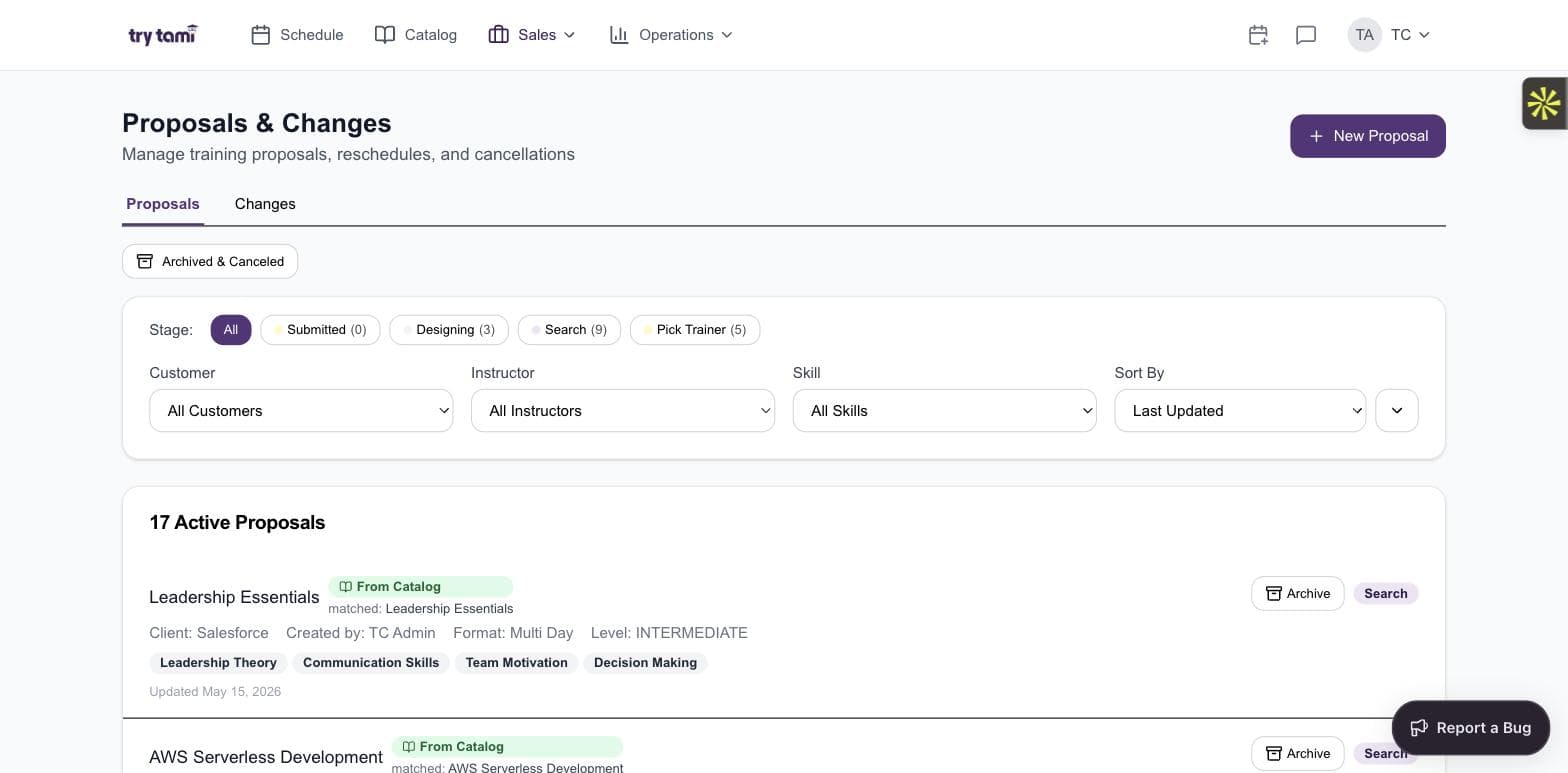
Proposals
From client request to confirmed booking, without the chaos.
Most training shops run their proposal pipeline in email and spreadsheets. TryTami gives you a real pipeline with named stages, so nothing falls through and nothing closes blind.
- Submitted → Designing → Search → Pick Trainer
- Filter by customer, instructor, skill
- Archive and cancel without losing the data
- Win/loss reporting baked in
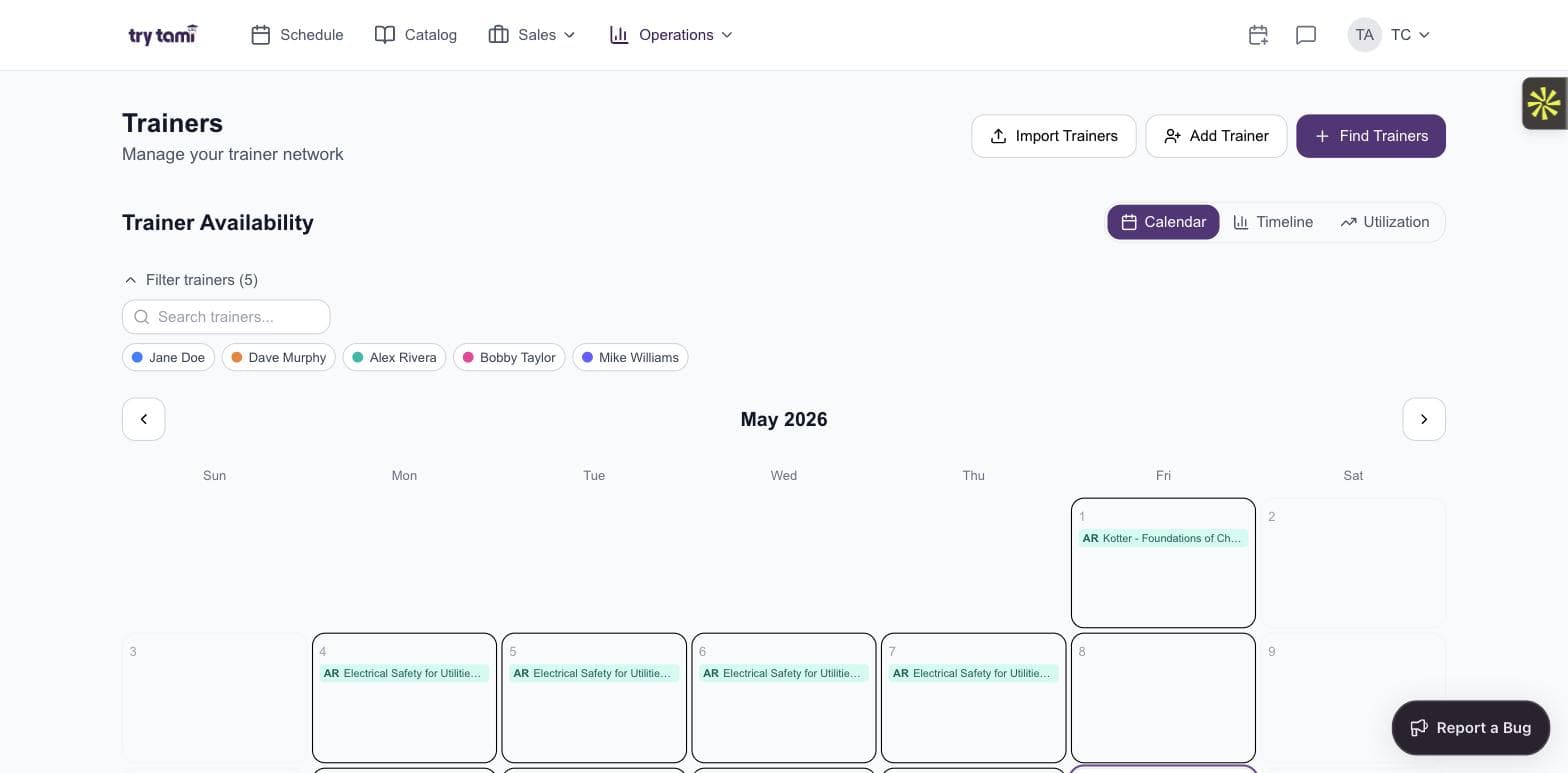
Trainers
A trainer network you can actually run.
Whether your delivery team is five people or five hundred, TryTami treats trainers as a first-class resource, with availability, utilization, and skill-matching built in.
- Calendar, timeline, and utilization views
- Filter by trainer or skill
- Add, import, or recruit trainers from one place
- Track what's owed to each trainer per session
How does TryTami's instructor matching work?
TryTami's AI-powered instructor matching surfaces the best-fit trainers for each session based on availability, skills, and other factors, replacing manual coordinator work that used to take hours per booking.
When a course needs a trainer, TryTami scores every qualified instructor against the requirements and shows you a ranked shortlist in seconds. Read more about instructor matching.
Plays nicely with the calendars you already use.
Two-way sync with Google Calendar and Outlook means your trainers' availability is always current, conflicts surface before you book, and no one ever double-enters a session again.
- Two-way sync with Google Calendar & Outlook
- Trainer availability stays current, automatically
- Conflicts caught before you commit
- Zero double-entry between systems
Is a TMS the same as scheduling software?
No. Scheduling is one capability inside a TMS. A training management system handles scheduling, but also course catalogs, trainer management, proposals, billing, and reporting, the full operational stack for an ILT business.
If you only need calendar coordination, a dedicated training scheduling tool may be enough. If revenue, trainer utilization, or proposals also live in your back office, a TMS is the right scope.
Built for ILT
Why TryTami isn't just another LMS.
ILT-first, not learner-first
An LMS optimizes for the learner experience. A TMS optimizes for the business that delivers training. TryTami is the latter.
Revenue is a first-class object
Booked, dedicated, public-course, client balances, owed-to-trainers, every metric a training CFO actually asks for, surfaced live.
Trainers, not just learners
Most platforms ignore the supply side. TryTami gives trainers their own first-class workflow and tracks utilization across the team.
Want to see your operation in TryTami?
Bring your real schedule to a live demo, we'll show how it would run inside the platform.
Frequently asked questions
What is the difference between training management software and an LMS?
A training management system (TMS) is built for the organization that delivers instructor-led training, scheduling courses, managing trainers, sending proposals, tracking revenue. A learning management system (LMS) is built for the learner, delivering self-paced content, tracking course completions, and issuing certifications. Most training providers need both, but a TMS is what runs the business.
Does TryTami handle virtual instructor-led training (VILT)?
Yes. TryTami treats virtual, classroom, on-site, and blended delivery as first-class course modes. You can run mixed catalogs and report on each mode independently.
Can TryTami track revenue per course and per trainer?
Yes. Every session is tied to a course, a client, and a trainer, so booked revenue, dedicated revenue, public course revenue, client balances, and what's owed to trainers all roll up automatically, no spreadsheet reconciliation required.
How does the AI instructor matching work?
TryTami's instructor matching scores every qualified trainer against the session's skill requirements and availability, then ranks them. You get a shortlist of the best-fit instructors in seconds, instead of coordinating availability manually.
How is TryTami priced?
TryTami has three plans priced by the features you need, not per seat: Starter, Pro, and Enterprise. Each is cumulative, with no per-seat fees and unlimited users, and each is quoted against your session volume rather than headcount. Request a demo for a firm number; see the plans page for the full feature matrix.
Can TryTami be used as HR training management software?
Yes. HR and L&D teams use TryTami as HR training management software to run onboarding, compliance, and upskilling programs, with per-employee records, scheduling, and reporting in one place.
Is training administration software the same as a TMS?
Yes. Training administration software is another name for a training management system (TMS) — the platform that administers the operational side of training: scheduling, instructors, registrations, records, billing, and reporting. TryTami is purpose-built training administration software for instructor-led training.
Is TryTami instructor-led training management software?
Yes. TryTami is instructor-led training (ILT) management software specifically — it's built around live sessions, instructors, and cohorts rather than self-paced content, so it handles scheduling, instructor matching, registration, attendance, and billing for in-person and virtual instructor-led training.
What training management platform works best for companies under 500 employees?
For companies under 500 employees that run instructor-led training, TryTami fits because pricing is feature-based with unlimited users, implementation takes about two weeks, and there is no IT project. If your training is entirely self-paced content, a lightweight LMS such as TalentLMS is the cheaper fit.
Which training management system is best for replacing manual spreadsheet training tracking?
TryTami replaces the scheduling, instructor, registration, and training-matrix spreadsheets with one system: sessions, attendance, completions, certifications, and instructor utilization update live, and every session carries its revenue and cost. Migration is founder-led and typically takes two weeks.
Which training management system supports multi-session daily scheduling and instructor communication?
TryTami schedules multiple sessions per day across instructors, rooms, and time zones with automatic conflict detection, and communicates schedule changes to instructors and clients automatically through the instructor and customer portals.
What's a good training management tool for instructor-led training?
The best training management tool for instructor-led training connects scheduling, instructor management, registration, billing, and reporting in one system instead of bolting separate tools together. TryTami is purpose-built for that, with AI instructor matching and no per-seat fees.
People also ask
Do I need a TMS if I already have an LMS?
Yes, if you deliver instructor-led training. An LMS handles content delivery; a TMS handles the operations behind live delivery, scheduling, trainer management, billing.
Read the TMS vs LMS guide →What is virtual instructor-led training (VILT)?
VILT is instructor-led training delivered remotely over video, same live cohort dynamics as classroom training, no travel.
Explore VILT in TryTami →How does AI fit into corporate training operations?
AI is replacing manual coordination tasks, instructor matching, schedule conflict resolution, proposal drafting, that used to require dedicated headcount.
How TryTami uses AI →How do I measure training ROI?
ROI in ILT comes from three levers: revenue per session, trainer utilization, and admin cost per session. A TMS surfaces all three in real time.
Read about training ROI →What's the best training management software?
The right TMS depends on your delivery model, scale, and integrations. Read our buyer's guide for criteria, weights, and a head-to-head comparison.
Best training management software →Explore TryTami's product
Ask TAMI
The AI assistant inside TryTami: ask about instructors, schedules, clients, and margins.
Instructor matching
AI-powered trainer matching based on availability, skills, and other factors.
Training operations statistics (2026)
Sourced data on ILT volume, staffing, and the operations gap.
Instructor utilization
How to measure and raise it without burning out the bench.
Free training schedule template
And the five signs you've outgrown it.
LXP vs LMS vs TMS
Which layer does what, and where a TMS fits.
Training tracking software
Real-time visibility into every course, trainer, and client across your operation.
Training scheduling software
Schedule sessions, trainers, and rooms in one purpose-built calendar.
Training registration software
Capture learner sign-ups, manage waitlists, and feed data into your operation.
Training analytics
The metrics that drive revenue, margin, and program decisions.
Evaluations
Close the loop on training effectiveness with post-session assessments.
Learning paths
Multi-course programs and certification tracks managed end-to-end.
Ops intelligence
The analytics layer that surfaces profitability, utilization, and risk.
Compare platforms
Head-to-head TryTami comparisons against every major TMS competitor.
Ready to run your training business, not your back office?
See TryTami in a 30-minute demo. We'll show you how it fits the way you actually deliver training.
From the blog
PSA Software vs a TMS: What a Training Company Actually Needs
Shopping for PSA software for a training business? Here is where PSA fits, where it doesn't, and why a TMS is usually the answer.
LXP vs LMS (vs TMS): What's the Difference?
LXP vs LMS explained: an LMS assigns and tracks content, an LXP helps learners discover it. Neither runs live training delivery. Which one you need, and when.
How Much Does Training Management Software Cost?
Training management software costs $300–$3,000+/mo depending on trainers, sessions, and tier. The pricing models, hidden costs, and how to judge ROI.